
Personal Notes File2.02 - Download
You'll be able to download in few seconds.
Publisher Description
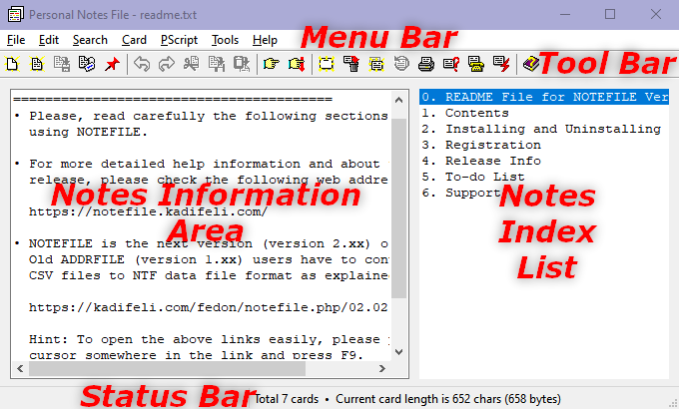
NOTEFILE is a utility which can be used for keeping personal notes information. For example, you can keep people's addresses, phone numbers, e-mail addresses, etc. It is similar to the old Windows CARDFILE.EXE program and it can read CRD files created by that program. You can use this program to keep personal notes too, just as you can use NOTEPAD.EXE for this purpose. However, by using this program, you can organize your data and access any information you need more easily.
Information is stored normally in NTF format. The standard NTF format stores data in compressed binary format. But you can save to and read from TXT files also. You can optionally encrypt your NTF files.
NOTEFILE has an integrated phone dialer similar to, but better than the one in CARDFILE.
NOTEFILE allows the user to extend its functionality by using Pascal scripting and external commands. Pascal scripts stored in a special script file and external commands stored in a special command file can be executed as user-defined NOTEFILE menu commands.
Another useful feature is the ability to execute single system commands stored as strings in your data file.
This program was written mainly to overcome some limitations of CARDFILE. For example, in CARDFILE the size of a card cannot be larger than 12x40 characters including the index line. In NOTEFILE there is no such limitation. The main philosophy behind this program is its simplicity and easiness of use.
Note: You can use the full functionality of NOTEFILE even if you do not register.
About Personal Notes File
This PIMS & Calendars program is available in English. It was last updated on 29 September, 2026. Personal Notes File is compatible with the following operating systems: Windows.
The company that develops Personal Notes File is FedSoft. The latest version released by its developer is 2.02.
The download we have available for Personal Notes File has a file size of 1.0 MB. Just click the green Download button above to start the downloading process. The program is listed on our website since 2021-10-10 and was downloaded 0 times. We have already checked if the download link is safe, however for your own protection we recommend that you scan the downloaded software with your antivirus. Your antivirus may detect the Personal Notes File as malware if the download link is broken.
How to install Personal Notes File on your Windows device:
- Click on the Download button on our website. This will start the download from the website of the developer.
- Once the Personal Notes File is downloaded click on it to start the setup process (assuming you are on a desktop computer).
- When the installation is finished you should be able to see and run the program.
Program Details
System requirements
Download information
Pricing
Version History
version 2.02
posted on 2021-10-10
See: https://www.kadifeli.com/fedon/notefile.php/G_RELHIST
version 2.01
posted on 2018-11-14
See: https://www.kadifeli.com/fedon/notefile.php/02.01/G_RELHIST
Disclaimer
External Download
We do not host Personal Notes File on our servers. We did not scan it for viruses, adware, spyware or other type of malware. This app is hosted by the software publisher and passed their terms and conditions to be listed there. We recommend caution when installing it.
The external download link for Personal Notes File is provided to you by apps112.com without any warranties, representations or guarantees of any kind, so access it at your own risk.
If you have questions regarding this particular app contact the publisher directly. For questions about the functionalities of apps112.com contact us.
